Hirens Boot Usb Administrator Password Reset
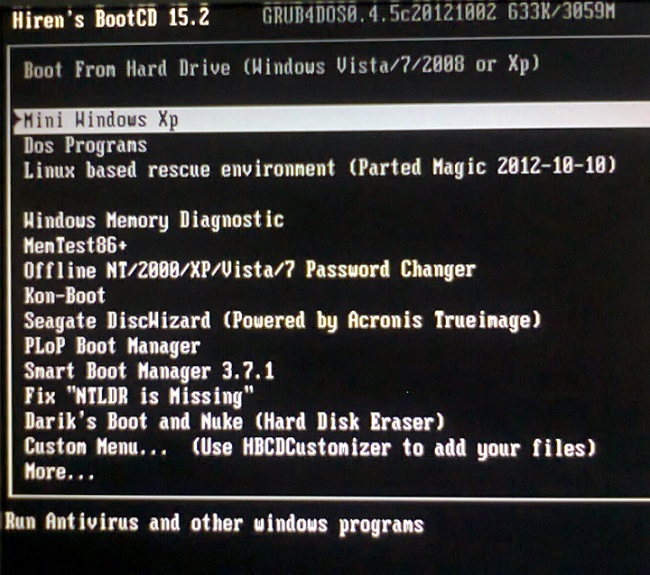
With Up Down keys select Mini Windows XP and press Enter. After getting Hirens BootCD ready Boot your Windows 10 computer from CD Change boot order.

Reset Forgotten Windows 10 Password With Hiren S Bootcd
Choose a Program to Launch.
Hirens boot usb administrator password reset. Click your username and the click Change password. November 19 2021 Posting Komentar The windows operating system begins with a welcome screen where you must enter the password for the account you want to use. The server should now boot and present the logon screen.
Net user username password Ex. Download Hirens Boot Usb 152. Net user rastley Pword Step 10.
Dont use Kon-Boot Windows password recovery method because it doesnt support Windows 108 password bypass. Boot your locked PC using Hirens BootCD that youve created. Reset Password Bios Hirens Boot - Top 3 Hiren S Bootcd Alternative In 2018 - Apma has the resources you need to help you through every step of your career.
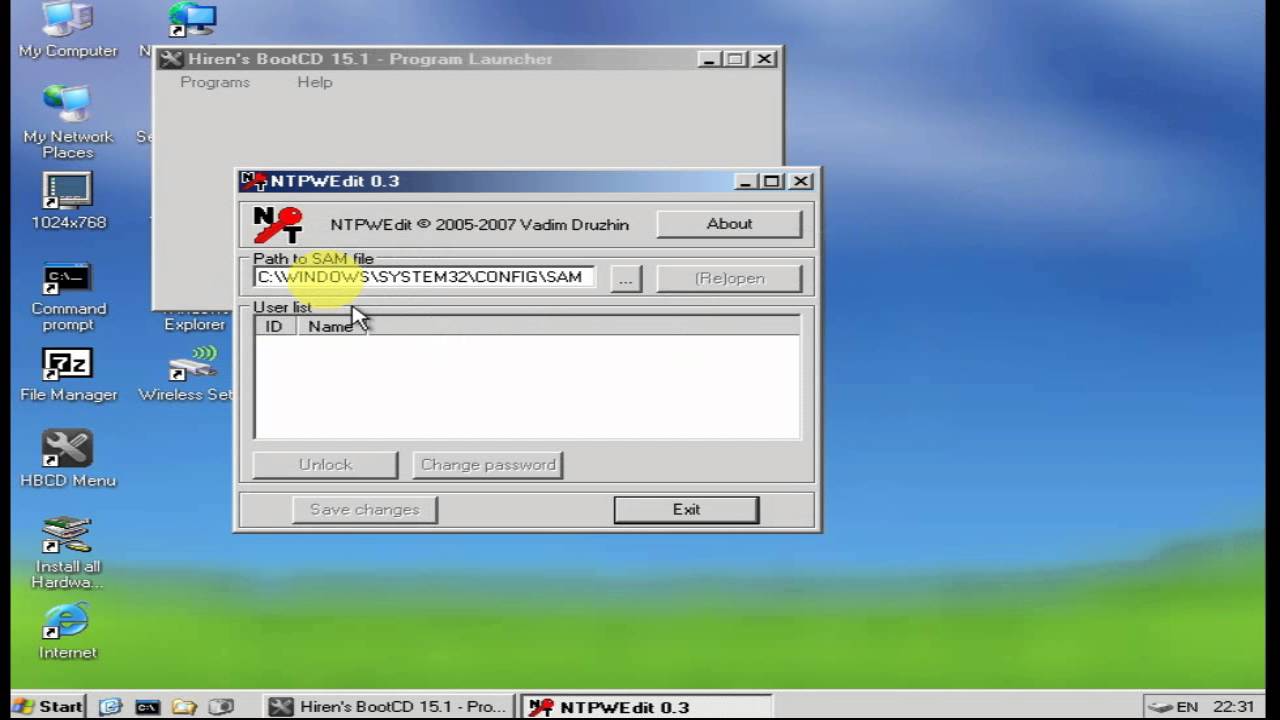
Open your SAM file It is usually located in CWindowsSystem32configSAM. Download Hirens CD 152 link 1 Download Hirens CD 152 Link 2 Convert Hirens CD to Bootable USB. Rest password or AddDelete User.
And then follow the instructions on the screen. Burn the ISO file to your CD or USB stick using the freeware. Hiren Boot Usb For Windows 7 Free Download.
Click to reset the administrator password. In this tutorial well show you how to reset forgotten Windo. 1 Easy Methods to Crack Windows Password Without Disk.
Choose Mini Windows XP. A tool to help recover and fix your computer even if it cannot boot into the. Reset or Remove Any Windows Password With Hirens BootCD.
In order to create a bootable USB drive for Hiren BootCD you need to prepare following things. Boot your computer with Hirens BootCD PE. On the desktop double-click on HBCD Menu.
What if you lost your Windows password. Reset Lost Window Administrator Password Using HirenS Bootcd Get any computer you can access and download the ISO image of Hirens BootCD 152 from here. Hirens Boot Cd Latest Version.
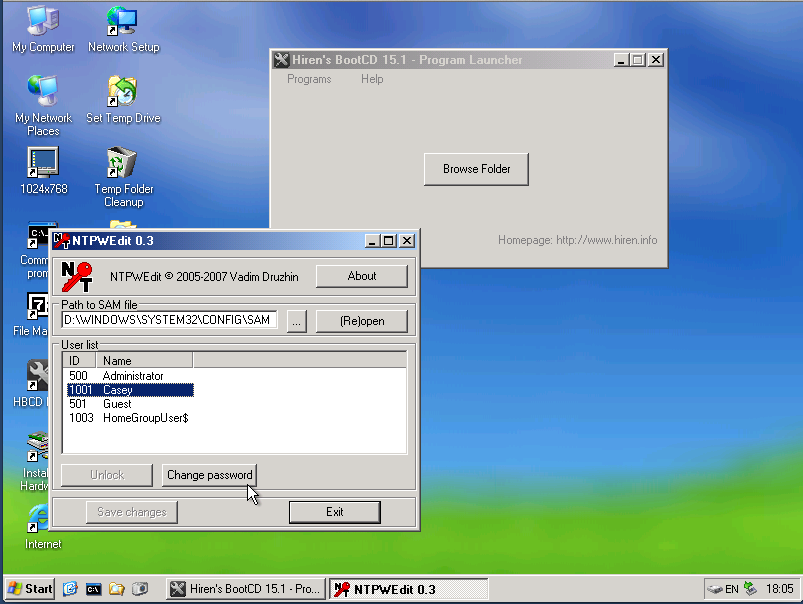
Goto Start Menu - Securiy - Passwords - NT Password Edit. Hirens Boot CD password reset is one of the oldest recovery methods which has been discussed in detail in the article. Burn the ISO image to your.
Scroll down the page and download the compressed file HirensBootCD152zip. Open your SAM file It is usually located in CWindowsSystem32configSAM. Boot your computer with Hirens BootCD and follow the steps below for clearing or resetting your password 11 Steps total Step 1.
Restart Your Computer By Pressing CTRLALTDEL or simply press the restart switch which is present on the front side of the computer cabinet or simply switch of the computer and start it again by pressing the POWER key of a computer or laptop. To set a password type your password both New password and Verify fields and then click to OK. Download the ISO image of Hirens BootCD from its official website about 593 MB.
Boot from the new prepared CD or USB disk then Lazesoft Recover My Password will launch automatically. When you see prompt on the screen press Enter. If you are stuck with a locked Windows account there are many other options.
Test ability to logon You just went through all that work to reset the password you should probably make sure it worked. Hirens Boot Usb Password Reset Windows 7 Free Download. Best Alternative for Hirens Boot USB Disk.
Hirens Boot CD 162 ISO Alternative to Recover Windows Admin Password. Here click Windows Key U. Reset Forgotten Windows 10 Password with Hirens BootCD.
Now the users wont have to ask around for how to use Hirens Boot USB to reset Windows password or how to reset Admin password using Hiren Boot CD. Hirens BootCD 152 ISO Rufus Bootable USB creator that helps format and create. The file extracts into a folder and within that folder you will find the bootable iso image file.
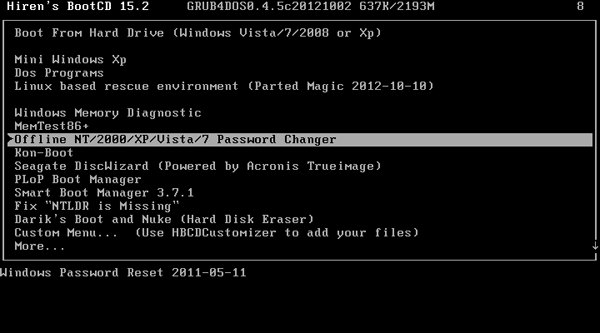
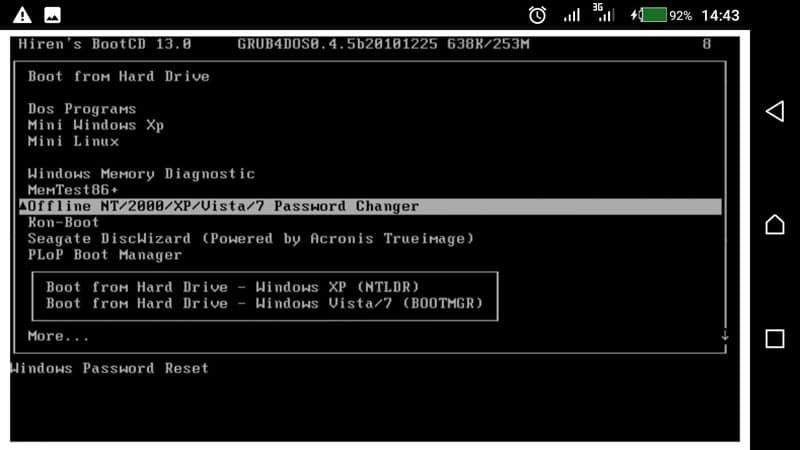
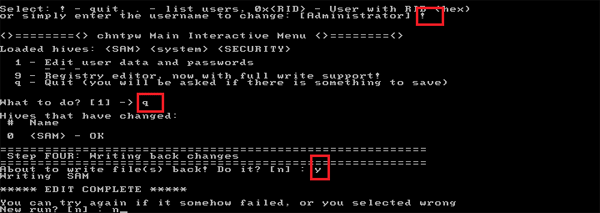
You will be prompted with the Hirens CD Menu from the actions select Offline NT2000XPVista7 Password Changer and hit Enter button on the keyboard. Make pen drive bootable. Reset password by modifying the following command.
Reset Windows Password using Windows Password Reset Tool. Hirens CD 2 Bootable USB is a free to use tool to make bootable USB disk from Hirens CD iso file in easy steps. Net user administrator Password123 This will set the password for the Administrator user to.
Get the USB pen drive. Enter Offline NT2000XPVista7 Password Changer. Enter y for yes and press Enter to finish the process.
Click your username and the click Change password. To reset your password with Hirens boot CD recovery on windows you just need to Boot your computer and follow the steps below for resetting your password. Create Bootable USB from Hirens iso file.
Now remove the Hirens Boot CD and press Ctrl Alt Delete to reboot your computer without password. Select the user account administrator for which you want to reset the password. Hirens Boot USB is a good choice for recovering Windows password and can go a long way in fixing many computer system issues.
At the prompt you can now change the password by typing the following command. If you cant see your USB flash drive in the list firstly try formatting your USB flash drive with Windows Format tool Goto My Computer - Right Click USB Drive - Click Format - Click Restore device defaults - Keep Quick Format Checked - Click Start and then click the refresh button on the right side of USB Device list. Select the booted device.
Unfortunately it is a very old method and hasnt been updated in a while. Restart your system and enter the boot mode. Password is not accepted after upgrading to Windows 10.
Easy to use just 123 and get your Bootable USB. Wait for the Windows XP to finish booting. Select your Windows installation volume.
To set a password type your password both New password and Verify fields and then click to OK. Goto Start Menu - Securiy - Passwords - NT Password Edit.
How To Use Hirens Bootcd To Reset A Windows Password Thetechmentor Com

Reset Local Administrator Password For Windows Server 2008 2003 7 Vista Xp Nt Prime Inspiration
Reset Or Remove Any Windows Password With Hiren S Bootcd Dvt It Solutions Dream It Live It
Break Administrator Password In Windows 7 8 10 Without Login Windows Password Key

How To Use Hirens Bootcd To Reset A Windows Password Thetechmentor Com

Reset Forgotten Windows 10 Password With Hiren S Bootcd

Reset Administartor And User Password Using Hiren Boot Cd 15 2 Youtube

How To Reset Your Windows Password Using Hiren S Boot Cd Live Linux Usb

How To Use Hiren S Boot Cd To Reset Password On Windows 10 8 7 Windows Password Key
100 Reset Lost Windows 7 Password With Hiren S Boot Cd Reset Windows7 Password Using Hiren S Boot Cd Youtube

Windows Local Account Administrator Password Reset Using Hiren S Boot Cd Rdcloudcompute
How To Reset Lost Windows Password With Hiren S Bootcd Password Recovery
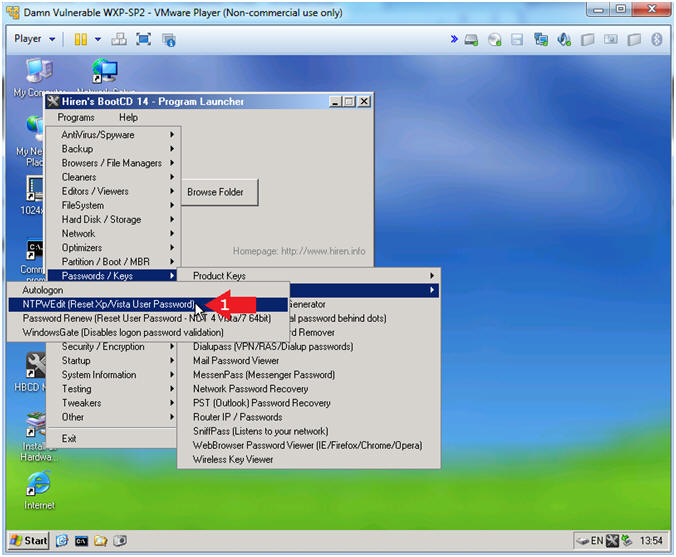
Hiren S Boot Cd Mini Windows Xp Ntpwedit Reset Xp Vista 7 User Password
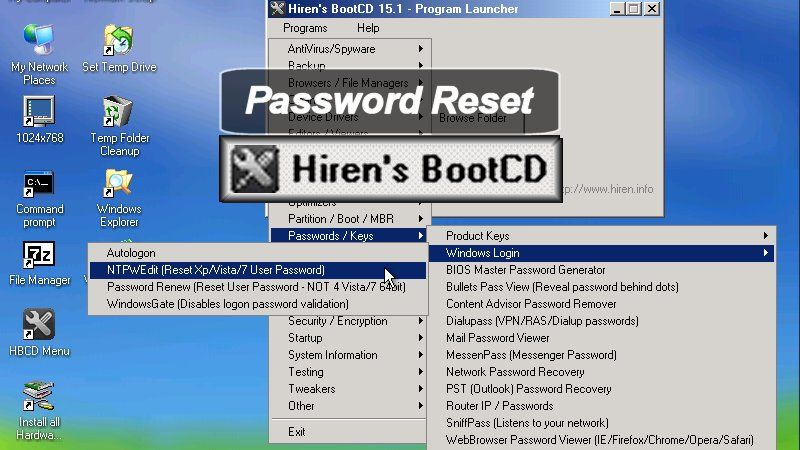
How To Use Hirens Bootcd To Reset A Windows Password Thetechmentor Com
Reset Forgotten Windows 10 Password With Hiren S Bootcd
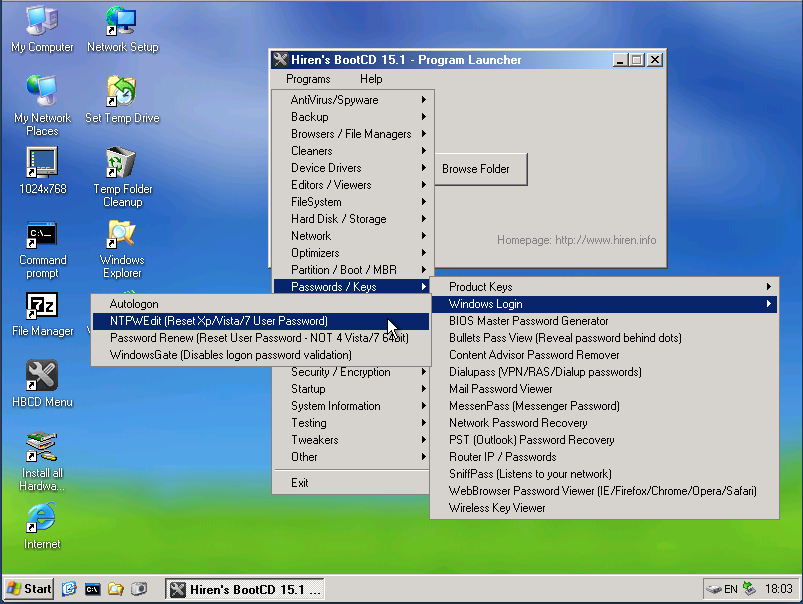
How To Use Hirens Bootcd To Reset A Windows Password Thetechmentor Com

Reset Forgotten Windows 10 Password With Hiren S Bootcd

Reset Forgotten Windows 10 Password With Hiren S Bootcd
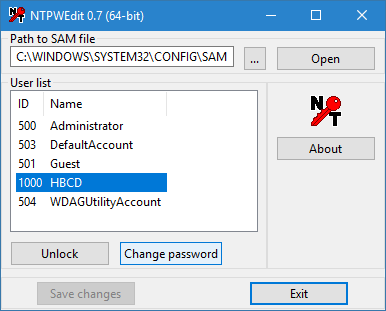
Howtos Hiren S Bootcd Pe
Posting Komentar untuk "Hirens Boot Usb Administrator Password Reset"